How to Implement Zero Trust Security for Your Business

Implementing a Zero Trust security model isn't just about new software; it's a completely different way of thinking about security. You have to shift from the old "trust but verify" mindset to a strategy where absolutely no user or device is trusted by default. The whole game is about continuously verifying every single access request and enforcing strict, need-to-know permissions.
What Zero Trust Really Means for Your Business
Let's cut through the jargon. Zero Trust isn't some magic box you can buy. It's a strategic framework built on one core idea: "never trust, always verify."
This is a massive departure from the traditional "castle-and-moat" security we all used to rely on. For years, the goal was to build a strong wall around the office network and assume anyone inside that wall was safe.
But that model is completely broken now. In a world with remote teams, cloud apps, and increasingly sophisticated cyber threats, the perimeter is gone. Your data isn't just inside your office anymore—it's on laptops at Starbucks, on phones, and living in cloud platforms like Microsoft 365.

From a Perimeter to a Principle
Instead of one big, brittle wall around your office, Zero Trust creates tiny, individual perimeters around every user, device, and application. This means every request to access something is treated as a potential threat and has to be rigorously checked out before the system grants access.
This shift is more than just a good idea; it's becoming a necessity. In fact, it's predicted that by 2025, around 60% of organizations will have moved to Zero Trust as their primary security strategy. The explosion of remote work and cloud services has made traditional defenses almost obsolete against modern attacks.
To really grasp this shift, it helps to see the two models side-by-side.
Traditional Security vs. Zero Trust Security
Security Aspect Traditional Model ('Castle-and-Moat') Zero Trust Model ('Never Trust, Always Verify')
Trust Assumption Trusts users and devices once inside the network. Trusts no one by default, regardless of location.
Primary Defense Strong network perimeter (firewalls, VPNs). Identity verification and device health checks.
Access Control Broad network access after authentication Least-privilege access to specific resources only.
Threat Focus Preventing external threats from getting in. Assuming threats can be both internal and external.
Verification Typically verified once at the entry point. Verified continuously for every single access request.
The differences are stark. One model assumes safety, while the other builds security from the ground up by assuming nothing is safe.
A Real-World Dallas Business Scenario
Think about a local Dallas accounting firm with a hybrid team. Some accountants are in the office, some are at home, and others are visiting clients. They all need access to sensitive financial data stored on a cloud server.
Under the old model, an employee connects to the network with a VPN and is basically trusted from that point on. If a hacker compromises that employee's laptop with a phishing email, they could have free rein to move around the network, steal client data, or launch a ransomware attack.
Zero Trust changes the game by assuming a breach is not a matter of if, but when. It shrinks the potential "blast radius" of an attack by isolating resources and continuously validating that only the right person, on a secure device, is accessing specific data for a legitimate reason.
With a Zero Trust framework in place, that same accountant trying to log in from home would trigger a series of automatic checks:
- Is this really the accountant? The system would demand multi-factor authentication (MFA) to prove their identity.
- Is their device secure? It would check if the laptop has up-to-date antivirus, all the latest security patches, and meets company policy.
- Is this access appropriate? The accountant would only be granted access to the specific client files they need, not the entire server.
This constant verification process makes the firm’s defenses incredibly stronger. It’s why frameworks like ISO 27001 certification are so important—they push for these kinds of comprehensive security strategies. Ultimately, Zero Trust is a foundational piece of modern IT security that protects your business from the inside out.
Building the Pillars of Your Zero Trust Architecture
Implementing a zero trust framework isn't about buying a single, magic-bullet product. It’s more like building a fortress, one strategic brick at a time. Each piece has a job, and when they work together, you create a truly resilient defense. For small and midsize businesses, the key is understanding these core pillars before you start building.
Instead of tackling one massive project, think of this as a methodical assembly of essential technologies. The whole point is to constantly verify identities, secure devices, and limit access at every single opportunity. This approach ensures that if one area is ever compromised, the damage is contained.
The infographic below shows the logical flow for getting a zero trust framework off the ground, starting with simply identifying your assets and moving through the key security controls.
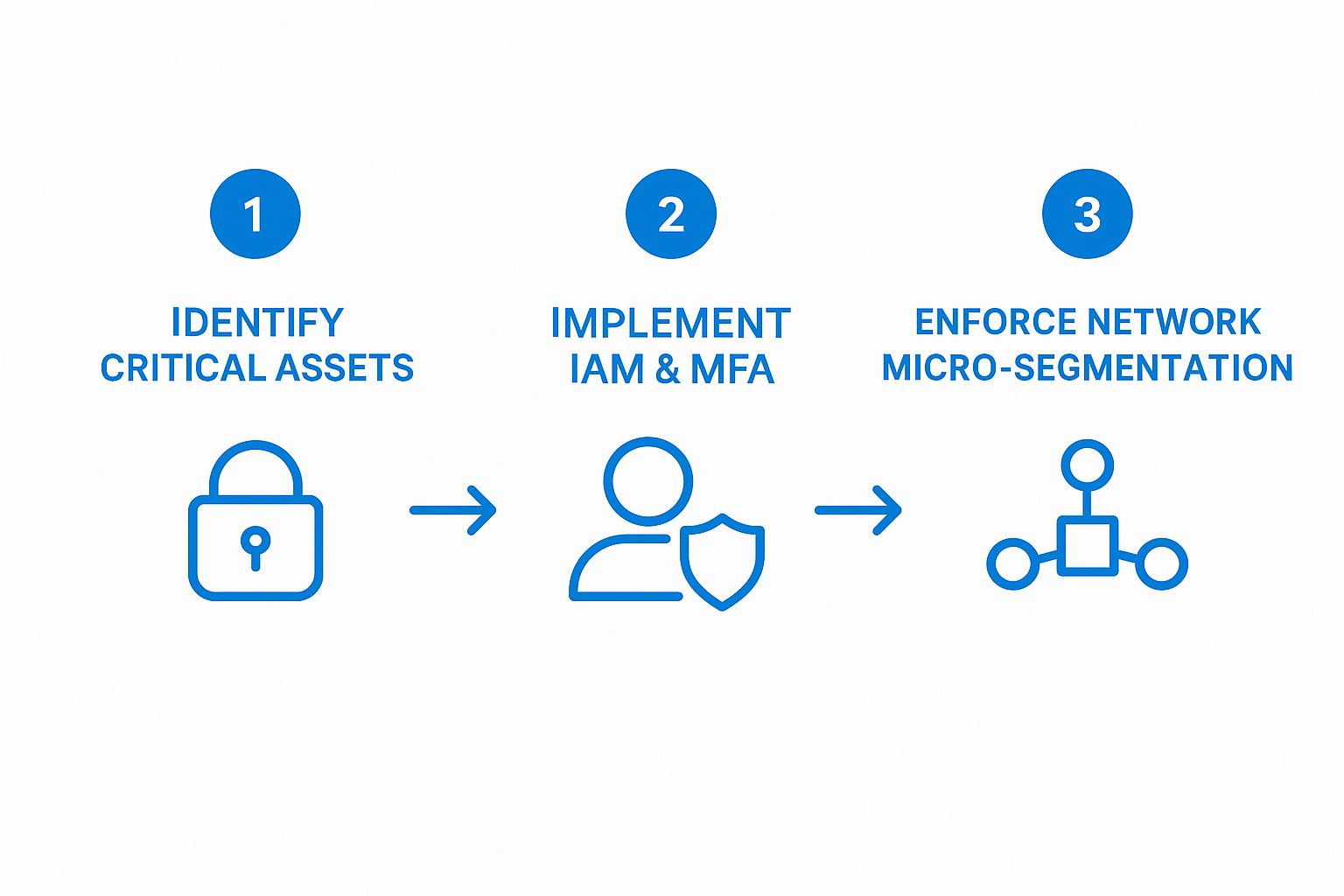
This visual really clarifies the progression. It all starts with knowing what you actually need to protect.
Identity and Access Management: The First Line of Defense
At the absolute heart of any zero trust strategy is Identity and Access Management (IAM). Think of it as your digital gatekeeper. IAM platforms are responsible for managing who gets access to what, making sure every user—employee, contractor, or vendor—has a single, verifiable digital identity.
The idea is simple: before anyone can touch a file, open an application, or log into a system, they first have to prove they are who they say they are. This shifts the focus of security away from the old-school network perimeter and puts it squarely on the user's identity.
For instance, we have a logistics client in Memphis that uses an IAM solution to manage everyone from drivers to dispatchers to back-office staff. Each role has a unique identity tied to very specific permissions.
A driver's credentials only grant access to their assigned routes and delivery manifests on their company tablet. They can't get into the company’s financial software or HR systems. This simple setup dramatically reduces the risk if that driver’s device is ever lost or stolen.
This concept is called "least privilege access," and it's a cornerstone of zero trust. People only get the bare minimum access they need to do their jobs. Nothing more.
Multi-Factor Authentication: The Unquestionable Proof
While IAM establishes who a user is, Multi-Factor Authentication (MFA) is how you prove it beyond a shadow of a doubt. Let's be honest, relying on just a password today is one of the biggest risks any business can take. MFA forces users to provide two or more verification factors to get in.
These factors usually fall into three categories:
- Something you know: A password or a PIN.
- Something you have: A code from an app like Microsoft Authenticator or a physical security key.
- Something you are: A biometric scan, like a fingerprint or your face.
For that same Memphis logistics company, every time a dispatcher logs into the shipping platform, they need their password and a one-time code sent to their phone. It’s a simple step, but it makes it exponentially harder for a bad actor to get in, even if they somehow steal a password.
As the Zero Trust market is projected to hit $38.37 billion USD by 2025, it's clear that IAM and MFA are foundational investments for businesses serious about security.
Securing Every Endpoint
Your employees' devices—their laptops, desktops, and phones—are the new perimeter. Endpoint security is all about making sure every single device connecting to your network is healthy, compliant, and free from malware. A compromised device is a wide-open door for an attacker, making this pillar completely non-negotiable.
Modern endpoint security is much more than old-school antivirus software. It involves continuous monitoring, automated patch management, and advanced threat detection. A critical piece of this is an Endpoint Detection and Response (EDR) solution, which actively hunts for suspicious activity on devices in real-time.
PWR Technologies provides comprehensive Endpoint Detection and Response services for businesses in Dallas and Memphis to turn every device into a fortified part of your security model. Another key piece of the puzzle is creating a robust third-party risk management program to make sure your vendors and partners meet your security standards.
Network Micro-Segmentation: Containing the Threat
Finally, there’s network micro-segmentation. This is the practice of breaking your network up into small, isolated zones. The logic is that if an attacker manages to breach one segment, they are trapped there. They can't move laterally across the network to get to more valuable data.
Think of it like the watertight compartments on a ship. A hole in one compartment won't sink the whole vessel. In a business, this could mean completely isolating the finance department's servers from the marketing team's cloud storage. A breach in one area simply can't spread, and that's a powerful tool in your zero trust arsenal.
A Practical Plan for Rolling Out Zero Trust
Trying to flip a switch and go "zero trust" overnight is a surefire way to create chaos. It disrupts work, frustrates your team, and often fails. A phased, strategic rollout is the only sane way to do this, especially for a small or midsize business. The key is to start small and protect what matters most first.
This isn't a one-and-done project; it’s a journey of steady, continuous improvement. Think of it like securing a high-value building. You wouldn't try to reinforce every single window and door at the same time. You’d start with the vault, where the most critical assets are, and then methodically work your way out.
This approach makes a complex security strategy completely manageable and budget-friendly.

First, Identify Your "Crown Jewels"
Before you can build any defenses, you have to know exactly what you're protecting. This first phase is all about identifying your "protect surface"—the handful of critical data, apps, and assets that would bring your business to its knees if compromised.
Get your team together and ask these pointed questions:
- What data loss would be catastrophic? We're talking about client financial records, patient health information (PHI), intellectual property, or proprietary source code.
- Which apps are absolutely essential for daily operations? This is your CRM, your accounting software, or your main line-of-business application.
- What are our most sensitive systems? Think about servers holding customer data or the admin portals for your cloud services.
Once you have this list, you can prioritize. Your very first zero trust project should be laser-focused on locking down these crown jewels.
Map How People and Data Actually Move
With your critical assets identified, the next job is to figure out how they’re used in the real world. You need to map the transaction flows to see how data moves, who needs access to what, from where, and why.
This isn't just an IT task. You have to talk to the people doing the work. Ask the sales team how they use the CRM or the finance department how they access accounting data. The goal is a crystal-clear picture of legitimate access patterns, which is the foundation for security policies that don't block productivity.
You might find, for example, that your marketing team only needs to see specific fields in the customer database for email campaigns—they definitely don't need access to sensitive financial details. This mapping tells you exactly where to apply precise, least-privilege controls.
Build Your Zero Trust Architecture with Modern Tools
Now it’s time to start building. The great news is, you can probably start with the security tools you already pay for. Platforms like Microsoft 365 and Azure were built with zero trust principles in mind and have incredibly powerful controls baked right in.
The goal is to architect an environment where every single access request is challenged and verified, no matter where it comes from. This means leaning on tools like:
- Microsoft Entra ID (formerly Azure AD) for rock-solid identity verification.
- Conditional Access Policies to enforce granular rules based on the user, device health, location, and real-time risk.
- Microsoft Intune for endpoint management, ensuring every device connecting to your network is secure and compliant.
Real-World Example: A Healthcare Clinic Secures Patient Data
A multi-location healthcare clinic in Dallas was worried about protecting its Electronic Health Record (EHR) system. For their first zero trust project, they focused only on the EHR. Using their existing Microsoft 365 tools, they rolled out policies that required multi-factor authentication for all staff and blocked access from any device that wasn't clinic-managed and compliant. Any attempt to log in from a personal phone or an unrecognized network was automatically denied. This single, focused project drastically cut the risk of a PHI breach without disrupting any other clinic operations.
This phased approach, starting with one critical asset, delivers a tangible security win and builds the momentum you need for the next stage. Understanding how your infrastructure and cloud setup can support this model is a crucial piece of the puzzle.
Create and Enforce Your First Policies
With the architecture in place, the final step in this initial phase is to write and enforce your first zero trust policies. These are the rules that govern access. The Kipling Method is a great framework to make sure you cover all your bases:
- Who is requesting access?
- What resource are they trying to reach?
- When are they requesting access?
- Where is the request coming from?
- Why do they need this access?
- How are they connecting?
Start small. Roll out your first policy to a test group of users or for a single application. Monitor the logs, get feedback, and fine-tune the rules before expanding. This iterative process is how you get security right without creating a frustrating experience for your team.
Overcoming Common Implementation Hurdles
Shifting to a Zero Trust framework is one of the smartest security moves a business can make, but let's be realistic—it’s a journey, not a flip of a switch. Especially for small and mid-sized businesses, you're likely to run into a few predictable bumps along the way. Most of these challenges boil down to three things: budget, people, and old tech.
The good news? None of these are showstoppers. With a little foresight, you can turn these potential roadblocks into stepping stones that actually make your security and your company culture stronger.
Taming the Budget Beast
"This sounds expensive." It’s often the first thing we hear from clients in Dallas and Memphis, and it’s a perfectly fair question. There's a common misconception that Zero Trust means throwing out everything you own and buying a whole new suite of high-priced tools.
That’s simply not the case. A successful rollout is all about working smart, not just spending big. You can start by getting more out of the tools you already pay for. For instance, platforms like Microsoft 365 and Azure have powerful Zero Trust features baked right in.
The trick is to roll it out in phases. Start with your most critical data and applications. This gives you a quick win and immediate security value without draining your bank account. It also helps to frame the conversation around ROI. The cost of a single data breach—in downtime, lost reputation, and potential fines—is almost always exponentially higher than the investment in getting security right from the start.
Zero Trust isn't an expense; it's an investment in business continuity. By preventing costly downtime and reputational damage from a security incident, the framework pays for itself many times over.
Managing Employee Pushback
Your team is your biggest strength, but when it comes to security changes, they can also be your biggest hurdle. People naturally resist things that feel like a hassle. Think new multi-factor authentication (MFA) prompts or tighter access controls. If your security measures feel like they’re just getting in the way of getting work done, your team will inevitably find workarounds.
This is where clear communication and security awareness training become non-negotiable. Don't just tell them what is changing; explain why. Show them how these new habits protect not just the company, but their own personal information as well.
When your team understands they're the first line of defense, their mindset shifts. They go from being a point of friction to being an active, and essential, part of your security strategy.
https://www.youtube.com/embed/t5BHL5dGn2E
Integrating with Legacy Systems
What about that old accounting software or custom-built application that’s critical to your business? Many companies rely on legacy systems that were never designed for a modern, Zero Trust world. They often don't support modern authentication protocols, and trying to integrate them with new security tools can feel impossible.
A full "rip and replace" strategy is rarely practical for an SMB. The better approach is to build a bridge between your old tech and your new security framework.
You can use tools like modern identity providers and application proxies to wrap a protective layer of Zero Trust security around these older systems. This lets you enforce strong authentication and access policies without ever touching the underlying code of the legacy app. It's a clever way to bring your old-school tech into the modern security fold.
A recent State of Zero Trust Security report confirms that these are common struggles. While 81% of organizations have started their Zero Trust journey, the challenges are real. The report found that 48% of businesses are held back by cost constraints and 22% face internal resistance from their teams.
This just reinforces how critical it is to plan for these hurdles from day one. And as you make these changes, protecting your data is paramount. A bulletproof plan for data backups and disaster recovery is an essential piece of the puzzle, ensuring your business stays resilient throughout the transition.
How Managed IT Services Simplify Your Zero Trust Journey
Let's be honest—for most small and mid-sized businesses, building a Zero Trust framework from scratch is a monumental task. It’s not something you can just wing. It demands deep cybersecurity knowledge, 24/7 monitoring, and a team that understands the complex tools needed to pull it off. Most SMBs just don't have those resources in-house.
This is exactly where partnering with a Managed IT Services Provider (MSP) can make all the difference. An MSP isn't just an outside vendor; they become your dedicated security partner, filling the gaps in your team's time, expertise, and resources. Instead of trying to hire an expensive, full-time cybersecurity expert, you get an entire team of specialists who live and breathe this stuff.

Expert Guidance and Proactive Management
One of the biggest perks of working with an MSP is having a guide for the entire journey. We can help you select and configure the right tools, design a Zero Trust architecture using platforms you might already own (like Microsoft Azure), and build security policies that actually work without grinding your business to a halt.
But it’s not just about the initial setup. We provide ongoing, proactive management to keep you safe. We deploy advanced solutions like Endpoint Detection and Response (EDR) to keep a constant watch on every single device connected to your network. This tech actively hunts for threats, meaning even if a brand-new vulnerability pops up, it gets flagged and neutralized before it can do any real damage. We take care of all the patching, updates, and monitoring, so your team can get back to focusing on what they do best.
Co-Managed IT: The Best of Both Worlds
What if you already have an in-house IT team? Perfect. A co-managed IT services model is designed for exactly this scenario. We don't come in to replace your people; we come in to supercharge them. Your team knows your business inside and out and handles the daily user needs, while we provide the specialized, high-level cybersecurity and infrastructure muscle.
It’s a truly collaborative approach. Your internal staff gets a powerful ally, and your business benefits from enterprise-grade security without the shocking price tag. The value of IT managed services goes beyond just security—it helps streamline your entire technology operation.
Client Story: Securing a Dallas Manufacturing Firm
We worked with a mid-sized manufacturing company here in Dallas that needed to adopt Zero Trust to protect their intellectual property. Their small IT department was completely overwhelmed. They chose a co-managed model with PWR Technologies, and we got to work.
Our first step was a full security assessment. We quickly identified their "crown jewels"—the proprietary design schematics—and built a Zero Trust environment around their existing Microsoft 365 and Azure setup. We rolled out conditional access policies and EDR on all their engineering workstations.
In just three months, they had a robust, verified security posture protecting their most critical data. The company hit its Zero Trust goals 50% faster and at a fraction of the cost it would have taken to hire a dedicated cybersecurity engineer. Today, their internal team co-manages the system with us, confident their defenses are rock-solid.
This is a perfect example of how the right partnership can turn a daunting project into a manageable, affordable win. An MSP takes the mystery out of implementing Zero Trust, transforming a complex technical headache into a real strategic advantage for your business.
Still Have Questions About Zero Trust?
Even with the best plan in hand, moving to a Zero Trust model naturally brings up some questions. If you're running a small or mid-sized business, you need straightforward answers, not a lot of technical jargon.
Let's cut through the noise. Here are the most common questions we hear from business owners in Dallas and Memphis about what it really takes to implement Zero Trust security.
Your Zero Trust Questions Answered
We've compiled the top questions we get from SMBs and laid out clear, practical answers to help you understand what a Zero Trust implementation really looks like.
QuestionAnswerIs Zero Trust too expensive for my small business?Not at all. The key is a phased rollout. You start with what you have, like the security features in Microsoft 365, and focus on protecting your most critical assets first. Compared to the six-figure cost of an average data breach, a strategic Zero Trust investment is far more affordable.How long will this take to implement?Zero Trust is an ongoing strategy, not a project with an end date. However, the foundational pieces, like getting Identity and Access Management (IAM) and Multi-Factor Authentication (MFA) in place, usually take a few months. It's all about making steady, meaningful improvements over time.Will Zero Trust slow down my employees?Quite the opposite, if it's done right. Modern tools like Single Sign-On (SSO) actually make life easier for your team by reducing password fatigue. A well-designed system works silently in the background, only stepping up security when a real risk is detected, so legitimate users often experience less friction.Can I use my existing IT infrastructure?Absolutely. A good Zero Trust plan builds on what you already have. We start by looking at your current setup to see where your strengths and gaps are. Most SMBs find they already have foundational tools in place. The goal is to integrate, not to rip and replace.
Ultimately, a well-planned Zero Trust strategy is designed to fit your business, not the other way around. It's about smart, incremental changes that dramatically improve your security without breaking the bank or disrupting your team's workflow.
Zero Trust is a journey, not a destination. The goal is to build a resilient security culture through constant verification and improvement, adapting as new threats and technologies emerge.
Ready to build a security framework that protects your business from every angle? The team at PWR Technologies LLC has the expertise to guide your Dallas or Memphis business through every step of your Zero Trust journey, from initial planning to ongoing management. Schedule a consultation today and discover how proactive IT can secure your future.